
TPO operating guide

How to conduct a campus placement drive.

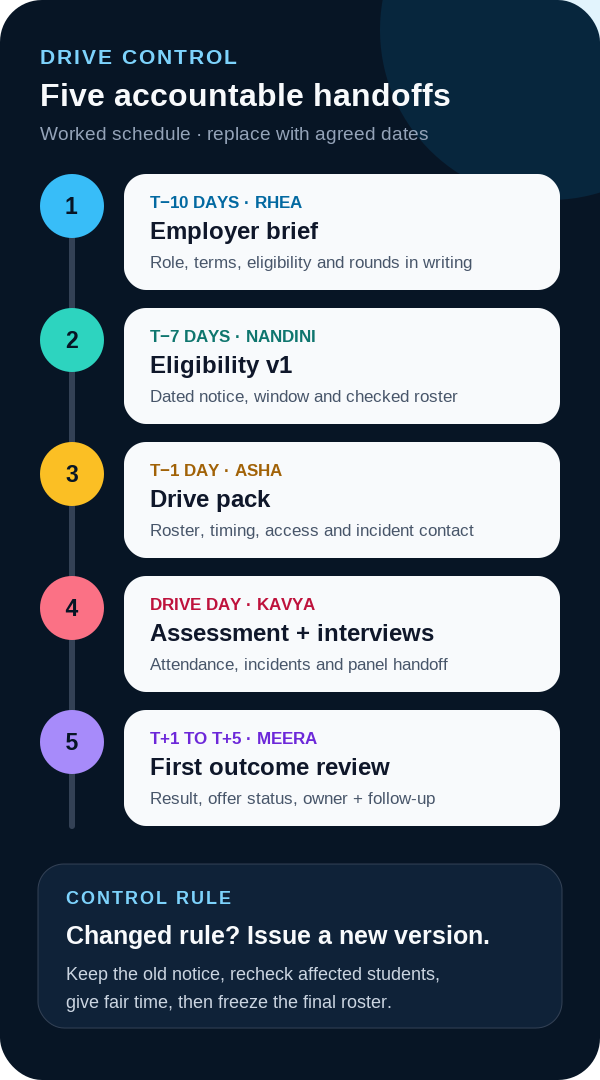
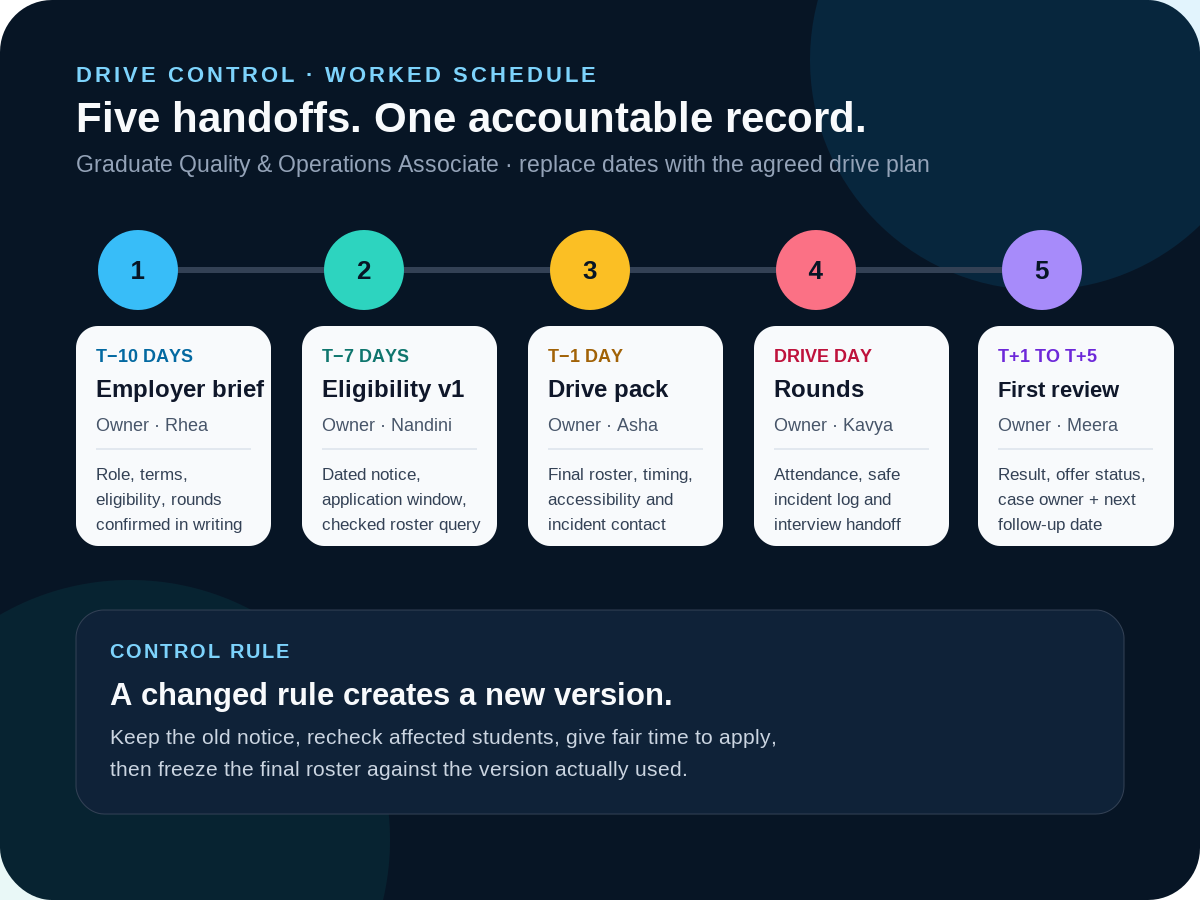
Start with a written employer brief. Publish one dated eligibility version, freeze a checked roster, give test-day exceptions an owner, then reconcile the result through actual joining. This worked schedule shows what the placement cell needs at every handoff.

Five-stage campus placement drive timeline from employer brief to verified joining, with an owner and evidence at each handoff
A drive is a chain of accountable handoffs. The dates below are a worked operating schedule; replace them with the dates agreed for the role in front of you.

Worked drive

One role, five controlled handoffs.

A manufacturing employer asks the college to run a drive for Graduate Quality and Operations Associates. The placement cell turns the request into a traceable plan instead of forwarding a message to students.

1 · T−10 working days

Write the employer brief

Owner and evidence

Rhea · employer-relations lead

Employer-approved role, location, compensation, work pattern, branches, CGPA and backlog definitions, rounds and contact path.

Next action

Return every ambiguity in one clarification list. Do not publish from a phone call or an old role description.

2 · T−7 working days

Publish eligibility v1

Owner and evidence

Nandini · TPO lead

Dated notice, eligibility version, application window and roster query showing included, excluded and pending records.

Next action

Resolve pending records before sharing the roster. Keep the version used for every later recheck.

3 · T−1 working day

Freeze the drive pack

Owner and evidence

Asha · drive coordinator

Final roster, room or access plan, accessibility needs, timings, incident contact and employer acknowledgement.

Next action

Send one confirmed pack. Keep new exceptions in a named queue rather than silently changing the roster.

4 · Drive day

Run assessment and interviews

Owner and evidence

Kavya · employer liaison

Attendance, safe incident log, attempt reference, round progression and interviewer handoff list.

Next action

Mark an unresolved attempt pending. Only the authorised owner decides whether a retest is allowed.

5 · T+1 to T+5 working days

Start outcome reconciliation

Owner and evidence

Meera · reporting owner

Employer result, written-offer status and a case owner with the next follow-up date for every pending student.

Next action

Record acceptance, confirmed start and actual joining on their later real dates. Never turn this first review window into an assumed joining window.

Drive-day tally

42

applications received

41 + 1

on frozen roster + held pending eligibility

39

started; two rostered students were no-shows

38 + 1

confirmed submissions + Priya pending at cut-off

The held eligibility record stays outside the frozen roster until resolved. Priya stays in the incident queue until the authorised assessment owner confirms her attempt status.

Employer brief

Do not open registration until the job is clear.

The employer's written job announcement is the control document for this drive. A different role or location needs its own confirmed terms.

Confirm these fields in writing for the Graduate Quality and Operations Associate drive.
Brief fieldWhat the TPO confirmsWhy it matters on drive day
Actual workThree to five recurring tasks, reporting line and work location.Students prepare for the role being offered, not a generic company name.
EligibilityBatch, degree or branch, minimum CGPA, backlog definition and document cut-off.The roster can be reproduced from the same written rule.
TermsCompensation components, training, work pattern, bond terms and joining location.Students can make an informed application and acceptance decision.
SelectionRounds, duration, permitted materials, accessibility contact and result owner.The coordinator can plan the day and route exceptions correctly.
CloseoutWho sends the result, written offer and joining update, and by when.The reporting owner knows what to follow up instead of treating selection as a join.

Publish decision

Ready, pending or held.

“Pending” is useful when one named field awaits confirmation. “Held” is the right decision when the role, employer contact, terms or eligibility cannot be verified. Neither status should be hidden in a student notice.

Use the printable checklist to record the drive owner, employer contact, deadline and approval at the same desk review.

Exception 1 · eligibility changes

The employer expands eligibility after applications open.

At 3 pm on Tuesday, the employer confirms that ECE students may apply alongside Mechanical and Production. Nandini does not quietly add names to the old roster.

The college applies its own published process. The employer's revised rule does not erase the earlier notice or decide how much application time is fair.
By whenOwnerActionRecord to keep
Tuesday · 4 pmRhea · employer-relationsObtain the revised branch wording from the authorised employer contact.Written clarification linked to the drive brief.
Tuesday · 5 pmNandini · TPO leadCheck the revision against campus policy. Issue eligibility v2, state what changed, preserve v1 and name the new deadline.Dated revised notice and both versions.
Wednesday · noonAsha · drive coordinatorRecheck all ECE records against the unchanged CGPA and backlog rules; queue unresolved records.Included, excluded and pending rows with reasons.
Wednesday · 5 pmNandini · TPO leadNotify affected students through the same channels, give fair time to apply, then freeze the roster.Notification record and final roster tagged eligibility v2.

Exception 2 · assessment receipt missing

Priya says she submitted, but no receipt appears.

The coordinator records only what can be checked safely. No one asks Priya to reveal live test content or guesses whether another attempt is permitted.

Record the incident.

  • Student name and college registration identifier.
  • Assessment attempt ID, start time and safe error or receipt description.
  • Coordinator who checked the issue and support ticket or employer contact used.
  • Current state: pending verification, not failed and not completed by assumption.

Wait for an authorised decision.

Asha routes the attempt ID and safe timeline to the named support owner and records the response. Priya receives a pending update and a time for the next communication. A retest is scheduled only if the authorised assessment owner approves it, with the permitted timing and instructions in writing.

Use the assessment incident guide

Interview handoff

Send the employer a checked list, not a forwarded spreadsheet.

The handoff makes the next decision obvious while sharing only the student information agreed for this drive.

Roster

Who progresses

Final candidate list, eligibility version and assessment status, with unresolved incidents clearly pending.

Schedule

Where and when

Interview slots, room or access details, panel contact and the person who can approve a same-day change.

Handoff

What the panel receives

The agreed profile and work evidence for the role, without private coaching notes or unrelated student data.

Return path

What comes back

Selected and waitlisted names, decision owner, written-offer contact and date of the next update.

Outcome closeout

Selection, offer, acceptance and joining are different records.

Close the drive only when the placement team can explain every count and every pending row.

Reconcile unique students, offers and verified joins separately. Keep internship and later PPO records linked without merging them into one funnel.
CheckpointEvidenceIf it is missing
Employer resultDated selected or waitlisted list from the authorised employer contact.Keep result pending and follow up with the named owner.
Written offerOffer document and terms received by the student.Do not treat a selection notice or LOI as the final offer.
Student decisionAccepted, declined or pending, with the response date.Ask by the college's stated deadline; do not infer acceptance.
Confirmed startJoining date and location confirmed by the employer.Track a follow-up separately from offer acceptance.
Actual joinJoining evidence checked under the college's process.Leave evidence pending; do not add it to verified joins.

People and platform

Use the platform for records. Keep decisions with accountable people.

A clear boundary prevents a score, status or missing field from becoming an unreviewed decision.

Algonauts supports

Authorised records and review.

  • An associated-student roster and profile context for authorised placement staff.
  • Placement and outcome records with evidence states that can remain pending until checked.
  • Quarterly assessment context that can help the placement team choose a coaching conversation.

Read how the official LayersRank assessment engine contributes assessment context without replacing a hiring decision.

The placement team decides

The rule, exception and outcome.

  • Whether the employer brief is complete enough to publish.
  • How eligibility changes are communicated and when the roster freezes.
  • Whether an assessment incident warrants an authorised retest.
  • Which coaching action follows a readiness review.
  • Whether offer, acceptance and joining evidence meets college policy.

Placement-cell tools

Keep the next action beside the operating record.

Review student readiness

Turn a specific performance gap into owned practice and a fresh check before the next drive.
Open the readiness guide

Reconcile placement outcomes

Audit offers, unique students, acceptances, joins and pending evidence without collapsing them into one number.
Open the tracker guide

Prepare students for the rounds

Share a practical preparation plan while the TPO keeps employer-specific eligibility and scheduling separate.
Open placement preparation

Take the control sheet into the placement cell.

The two-page printable checklist covers the drive owner, employer brief, stage gates, both exception paths and outcome closeout.

Download PDF
Return to Colleges